Week 2: A Brief Overview and History of the Modern Web
Web Sites vs Web Apps?
- Interactive?
- User-generated content?
- Informational vs fun?
What is the web?
A set of standards: TCP/IP, HTTP, URLs, HTML, CSS, …
A means for distributing structured and semi-structured information to the world
Infrastructure: Servers, Networks
Perspectives in Web Development
Systems Perspective
How can we design robust, efficient, & secure interactions between computers?

An individual web app may run on:
- Thousands of servers owned and managed by different orgs
- Millions of clients
- >TBs of constantly changing data
What happens when a server crashes? How do we prevent a malicious user from accessing user data?
Software Engineering Perspective
How can we design for change & reuse?
An individual web app may have:
- Hundreds of developers
- Millions of lines of code
- New updates deployed many times a day
- Much functionality reused from code built by other organizations
How can a developer successfully make a change without understanding the whole system?
Human-Computer Interaction (HCI) Perspective
How can we design web apps that are usable for their intended purpose?
An individual web app may have:
- Millions of users
- Tens of different needs
What happens when a new user interacts with the web app? How can we make a web app less frustrating to use?
Pre-Web
“As We May Think”, Vannevar Bush — The Atlantic Monthly, July 1945
- Recommended that scientists work on inventing machines for storing, organizing, retrieving and sharing the increasingly vast amounts of human knowledge
- He targeted physicists and electrical engineers — there were no computer scientists in 1945
Pre-Web: Zettelkasten (late 19th, early 20th c.)
German for “slipbox” — an organized cabinet of interlinked notes
- Each note contained organizational metadata: categories, the note’s index number, and a list of related note index numbers
- German philosopher Hans Blumenberg was said to have a collection of 30,000 notes
- Still in use today via apps such as Obsidian, Joplin, and Notion
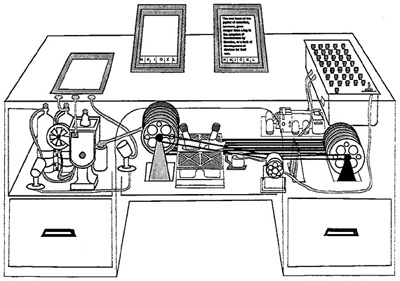
Pre-Web: Memex
MEMEX = MEMory EXtension
- Create and follow “associative trails” (links) and annotations between microfilm documents
- Technically based on “rapid selectors” Vannevar Bush built in the 1930s to search microfilm
- Conceptually based on human associative memory rather than indexing
Pre-Web: Memex
Never built.
Hypertext and the WWW
- 1965: Ted Nelson coins “hypertext” (the HT in HTML) — “beyond” the linear constraints of text
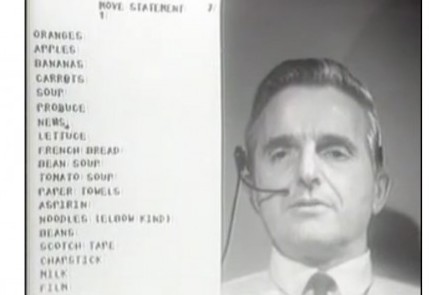
- 1968: Doug Engelbart gives “the mother of all demos” — windows, hypertext, graphics, video conferencing, the mouse, collaborative real-time editor
- 1969: ARPANET comes online
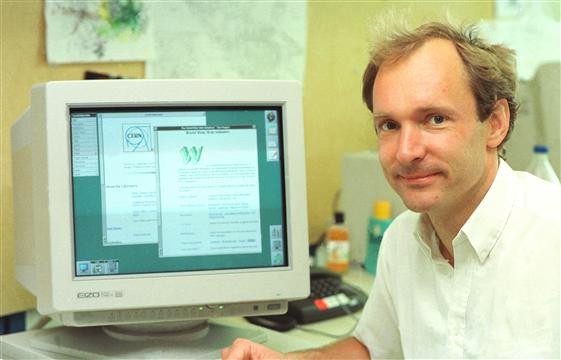
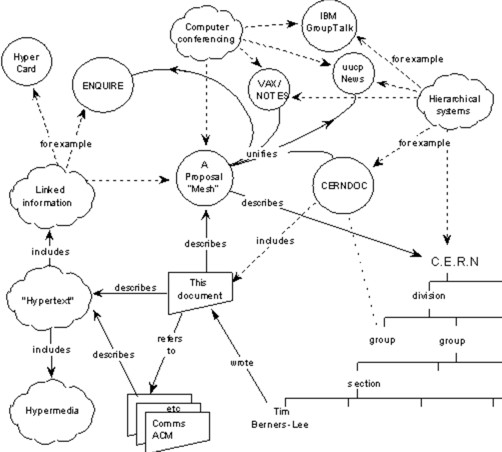
- 1980: Tim Berners-Lee writes ENQUIRE, a notebook program which allows links to be made between arbitrary nodes with titles
Apple HyperCard — a local, proto-web
Simple, but programmable card filing system included with Macintosh System 6 (1987)
- Allowed for GUI development of interactive elements such as forms and animations using the HyperTalk language
- Each card or stack could be linked to other cards or stacks
- Later evolutions included database integrations and access to the web itself
Origin of the Web
1989: Tim Berners-Lee, “Information Management: A Proposal”
- Became what we know as the WWW
- A “global” hypertext system full of links (which could be single-directional, and could be broken!)
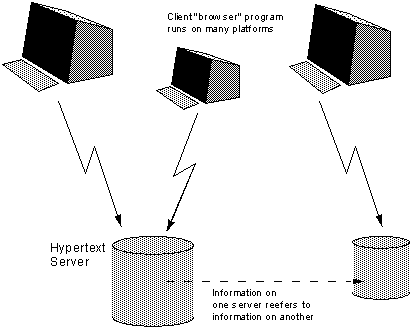
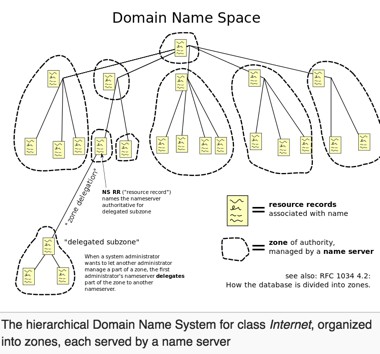
DNS Makes the Internet Discoverable
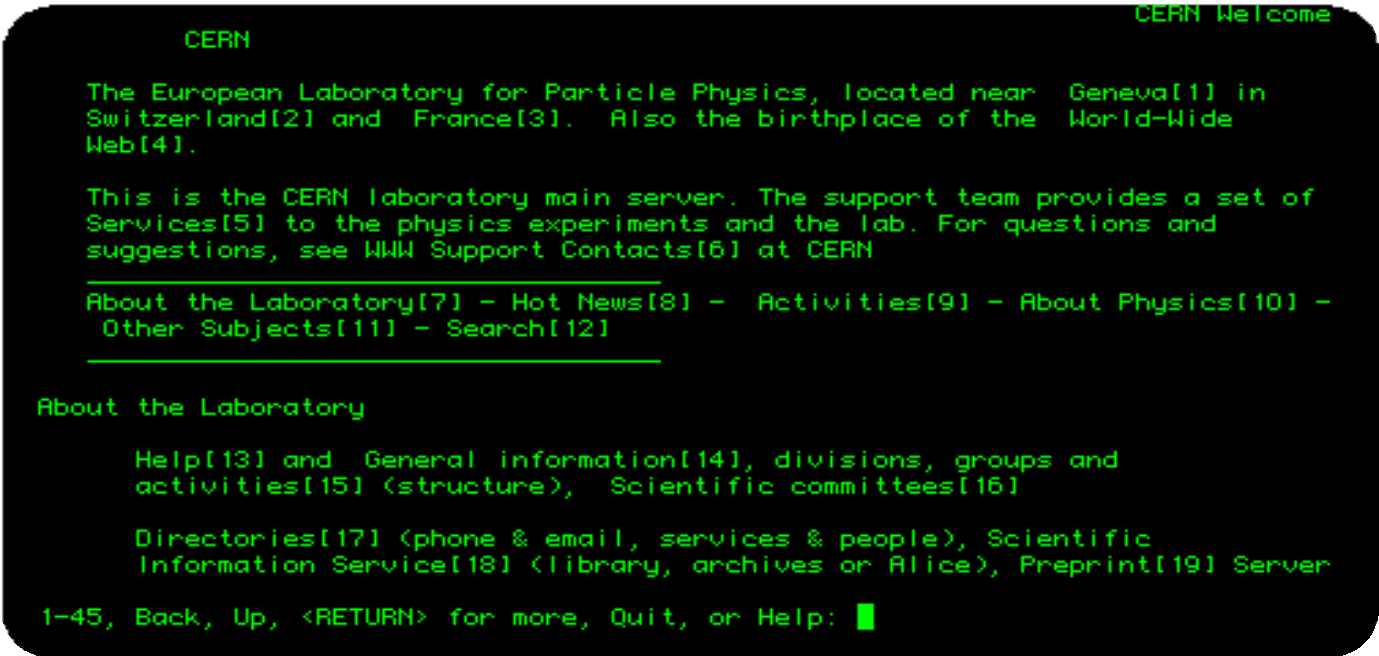
© CERN
Early Browsers
URI: Universal Resource Identifier
| Part | Example | Meaning |
|---|---|---|
| scheme | http |
Use HTTP scheme |
| authority | cs.ucf.edu |
Connect to this host (or IP address) |
| path | /about/about-us |
Request this resource |
Other popular schemes: ftp, mailto, file
More details: https://en.wikipedia.org/wiki/Uniform_Resource_Identifier
DNS: Domain Name System
Domain name system (DNS) (~1982)
- Mapping from names to IP addresses
- E.g.
cs.ucf.edu→132.170.216.243
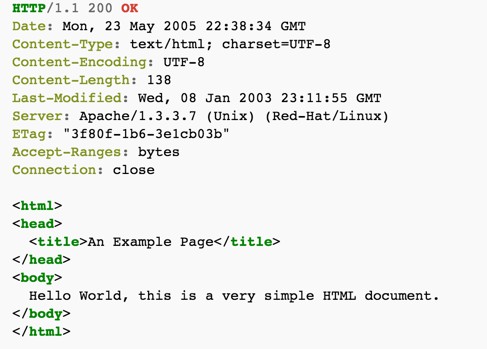
HTTP: Hypertext Transfer Protocol
High-level protocol built on TCP/IP that defines how data is transferred on the web
HTTP Request:
HTTP Response:
(Server reads file from disk)
HTTP Requests
GET— request type. Other popular types:POST,PUT,DELETE,HEAD/about/about-us— the resource- Request may contain additional header lines specifying client info, form parameters, cookies, etc.
- Ends with a carriage return / line feed (blank line)
- May also contain a message body, delineated by a blank line
HTTP Responses
Response status codes:
1xxInformational2xxSuccess3xxRedirection4xxClient error5xxServer error
Common MIME types: application/json, application/pdf, image/png
Properties of HTTP
Request-response
- Interactions always initiated by client request to server
- Server responds with results
Stateless
- Each request-response pair is independent from every other
- Any state information (login credentials, shopping carts, etc.) needs to be encoded somehow
HTML: HyperText Markup Language
HTML is a markup language — a language for describing parts of a document. NOT a programming language.
Tags are added to markup the text, encompassed with <>:
Simple markup tags: <b>, <i>, <u> (bold, italic, underline)
Web vs. Internet
| Layer | Protocols |
|---|---|
| Application layer | DNS, FTP, HTTP, IMAP, POP, SSH, Telnet, TLS/SSL, … |
| Transport layer | TCP, UDP, … |
| Internet layer | IP, ICMP, IPSec, … |
| Link layer | PPP, MAC (Ethernet, DSL, ISDN, …), … |
The Web (HTML, CSS, Browser) sits at the Application layer.
The Modern Web
Evolving competing architectures for organizing content and computation between browser (client) and web server:
| Era | Architecture |
|---|---|
| 1990s | Static web pages |
| 1990s | Server-side scripting (CGI, PHP, ASP, ColdFusion, JSP, …) |
| 2000s | Single page apps (jQuery) |
| 2010s | Front-end frameworks (Angular, React, Vue…), microservices |
Static Web Pages
- URL corresponds to directory location on server
e.g.http://domainName.com/img/image5.jpg→img/image5.jpgon server - Server responds to HTTP request by returning requested files
Advantages: Simple, easily cacheable, easily searchable
Disadvantages: No interactivity
Web 1.0 Problems
- At this point, most sites were “read only”
- Lack of standards for advanced content — “browser war”
- No rich client content… the best you could hope for was a Java applet
Browser Marketshare Over Time
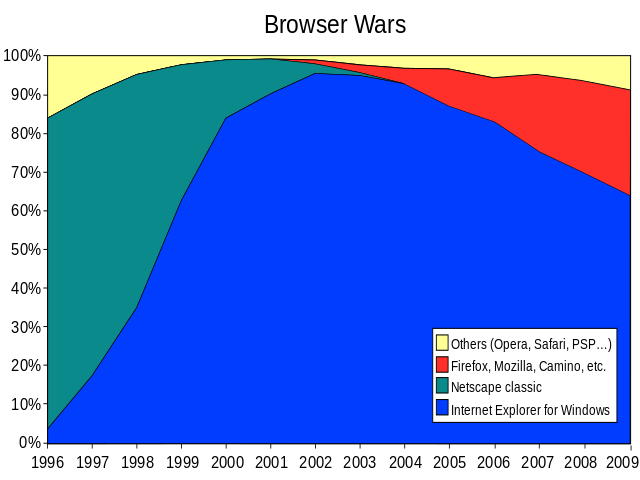
https://en.wikipedia.org/wiki/Browser_wars
HTTP: Server-Side Execution
Instead of reading a file from disk, the web server runs a program:
HTTP Request:
HTTP Response:
Dynamic Web Pages
HTTP Request:
GET /swe-432-f22/index.html HTTP/1.1
Host: kpmoran.cs.gmu.edu
Accept: text/html
Web Server → Runs a program
→ Web Server Application
→ Syllabus Generator Application
→ "Here's some text to send back"
HTTP Response:
HTTP/1.1 200 OK
Content-Type: text/html; charset=UTF-8
<html><head>...
There’s a standard mechanism to talk to these auxiliary applications, called CGI (Common Gateway Interface)
Server-Side Scripting
Generate HTML on the server through scripts.
Early approaches emphasized embedding server code inside HTML pages.
Examples: CGI
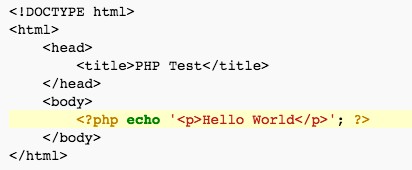
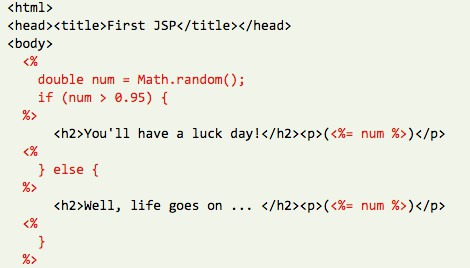
Server-Side Scripting Architecture
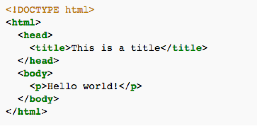
Browser ←(HTTP Request) → Web Server ←→ Database
←(HTTP Response)→
HTML templates, server logic, load/store state to database
Limitations of Server-Side Scripting
Poor modularity
- Code representing logic, database interactions, and generating HTML presentation all tangled
- Example of a “Big Ball of Mud” [1]
- Hard to understand, difficult to maintain
Still a step up over static pages!
[1] http://www.laputan.org/mud/
Server-Side Frameworks
Framework that structures server into tiers, organizes logic into classes:
- Create separate tiers for presentation, logic, and persistence layer
- Can understand and reason about domain logic without looking at presentation (and vice versa)
Examples: ASP.NET/MVC, Ruby on Rails, Django
Server-Side Framework Architecture
Browser ←(HTTP Request)→ Web Server ←→ Database
←(HTTP Response)→
Presentation tier | Domain logic tier | Persistence tier
Limitations of Server-Side Frameworks
- Need to load a whole new web page to get new data
- Users must wait while new web page loads, decreasing responsiveness & interactivity
- If server is slow or temporarily non-responsive, whole user interface hangs!
- Page has a discernible refresh, where old content is replaced and new content appears rather than a seamless transition
Single Page Application (SPA)
- Client-side logic sends messages to server, receives response
- Logic is associated with a single HTML page, written in JavaScript
- HTML elements dynamically added and removed through DOM manipulation
- Processing that does not require the server may occur entirely client-side, dramatically increasing responsiveness & reducing needed server resources
Classic example: Gmail
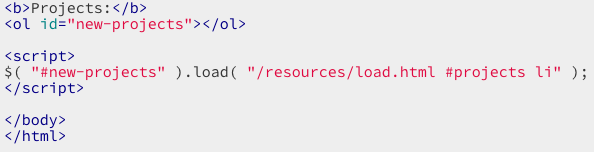
Single Page App Example
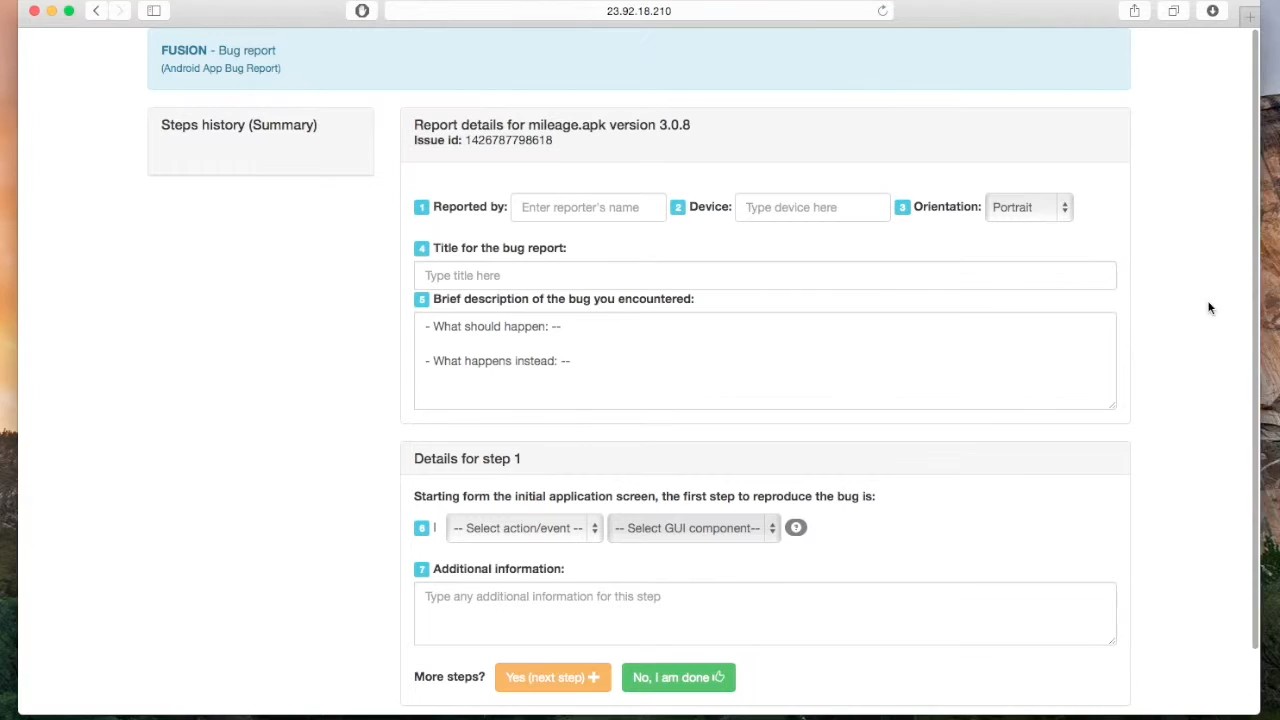
SPA Enabling Technologies
AJAX: Asynchronous JavaScript and XML
- Set of technologies for sending asynchronous requests from web page to server, receiving response
DOM Manipulation
- Methods for updating the HTML elements in a page after the page may already have loaded
JSON: JavaScript Object Notation
- Standard syntax for describing and transmitting JavaScript data objects
jQuery
- Wrapper library built on HTML standards designed for AJAX and DOM manipulation
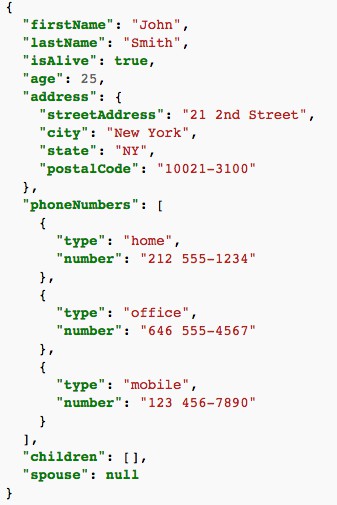
https://en.wikipedia.org/wiki/JSON
Single Page Application Architecture
Browser (JavaScript) ←(HTTP Request)
→ Web Server ←→ Database
←(HTTP Response JSON)→
events ↕ HTML elements
Presentation tier | Domain logic tier | Persistence tier
Limitations of SPAs
Poor modularity client-side
- As logic in client grows increasingly large and complex, becomes “Big Ball of Mud”
- Hard to understand & maintain
DOM manipulation is brittle & tightly coupled
- Small changes in HTML may cause unintended changes (e.g., two HTML elements with the same id)
Poor reuse
- Logic tightly coupled to individual HTML elements, leading to code duplication of similar functionality in many places
Front-End Frameworks
- Client is organized into separate components, capturing model of web application data
- Components are reusable, have encapsulation boundary (e.g., class)
- Components separate logic from presentation
- Components dynamically generate corresponding code based on component state
- In contrast to HTML element manipulation, framework generates HTML, not user code, decreasing coupling
Examples: React, Vue, Svelte, Angular, Solid
Front-End Framework Architecture
Browser (Front-end framework) Web Server ←→ Database
Component presentation ↕ logic
Component presentation ↕ logic Presentation tier
Component presentation ↕ logic Domain logic tier
Persistence tier
←(HTTP Request)→ ←(HTTP Response JSON)→
Limitations of Front-End Frameworks
Duplication of logic in client & server
- As clients grow increasingly complex, must have logic in both client & server
- May even need to be written twice in different languages! (e.g., JavaScript, Java)
Server logic closely coupled to corresponding client logic
- Changes to server logic require corresponding client logic changes
Difficult to reuse server logic
Microservices
Small, focused web server that communicates through data requests & responses
- Focused only on logic, not presentation
- Organized around capabilities that can be reused in multiple contexts across multiple applications
- Rather than horizontally scale identical web servers, vertically scale server infrastructure into many small, focused servers
Microservice Architecture
Browser Web Servers ←→ Databases
←(HTTP Request)→ Microservice A ←→ DB A
←(HTTP Response JSON)→ Microservice B ←→ DB B
Front-end framework:
Component presentation ↕ logic
←→ Microservice C ←→ DB C
Component presentation ↕ logic
Component presentation ↕ logic
Architectural Styles
An architectural style specifies:
- How to partition a system
- How components identify and communicate with each other
- How information is communicated
- How elements of a system can evolve independently
Constant Change in Web Architectural Styles
Key drivers:
- Maintainability — new ways to achieve better modularity
- Reuse — organizing code into modules
- Scalability — partitioning monolithic servers into services
- Responsiveness — movement of logic to client
- Versioning — support continuous roll-out of new features
Web standards have enabled many possible solutions — explored through many, many frameworks, libraries, and programming languages
The Web Today
- Many technologies for each architectural style; most support more than one
- Applications often evolve from one architectural style to another — leading to applications combining multiple architectural styles
- e.g., Single page app that uses server-side scripting for a separate set of pages
- Newer architectural styles not always better — more complex, may be overkill for simple sites
Philosophy of the Internet
Decentralisation: No permission is needed from a central authority to post anything on the Web — no “kill switch”!
Non-discrimination: Net Neutrality — everyone connects at the same quality of service.
Bottom-up design: Code developed in full view of everyone, encouraging maximum participation and experimentation.
Universality: All computers must speak the same languages, regardless of hardware, location, or cultural/political beliefs.
Consensus: Universal standards require everyone to agree — achieved through transparent, participatory processes at W3C.
From http://webfoundation.org/about/vision/history-of-the-web/
Internet Governance
IETF = Internet Engineering Task Force
- Open, all-volunteer organization
- Organized into working groups on specific topics
Request for Comments (RFC)
- One of a series, begun in 1969, of numbered informational documents and standards followed by commercial software and freeware in the Internet and Unix communities
- All Internet standards are recorded in RFCs
A Brief Intro and History of Backend Programming
Why We Need Backends
Security: SOME part of our code needs to be “trusted”
- Validation, security, etc. that we don’t want to allow users to bypass
Performance:
- Avoid duplicating computation (do it once and cache)
- Do heavy computation on more powerful machines
- Do data-intensive computation “nearer” to the data
Compatibility:
- Can bring some dynamic behavior without requiring much JS support
Dynamic Web Apps

Web "Front End" "Back End" Persistent Storage
(Presentation, (Data storage, + Some other APIs
Some logic) Some other logic)
Where Do We Put the Logic?
| Frontend | Backend | |
|---|---|---|
| Pros | Very responsive (low latency) | Easy to refactor across multiple clients; Logic hidden from users (security, compatibility) |
| Cons | Security, Performance, Unable to share between front-ends | Interactions require a round-trip to server |
Why Trust Matters
Example: Banking app
Imagine this code runs in the browser:
What’s wrong?
How do you fix that?
API: Application Programming Interface
Microservice offers a public interface for interacting with backend:
- Offers abstraction that hides implementation details
- Set of endpoints exposed on the microservice
Users of the API might include:
- Frontend of your app
- Frontend of other apps using your backend
- Other servers using your service
Support Scaling
Yesterday, cityinfo.org had 10 daily active users. Today, it was featured on several news sites and has 10,000 daily active users.
- Yesterday, you were running on a single server. Today, you need more than a single server.
Can you just add more servers?
What should you have done yesterday to make sure you can scale quickly today?
Support Change
Due to your popularity, your backend data provider just backed out of their contract and are now your competitor. The data you have is now in a different format. Also, you’ve decided to migrate your backend from PHP to node.js to enable better scaling.
How do you update your backend without breaking all of your clients?
Support Reuse
You have your own frontend for cityinfo.org. But everyone now wants to build their own sites on top of your city analytics.
Can they do that?
Design Considerations for Microservice APIs
| Concern | Question |
|---|---|
| API | What requests should be supported? |
| Identifiers | How are requests described? |
| Errors | What happens when a request fails? |
| Heterogeneity | What happens when different clients make different requests? |
| Caching | How can server requests be reduced by caching responses? |
| Versioning | What happens when the supported requests change? |
REST: REpresentational State Transfer
Defined by Roy Fielding in his 2000 Ph.D. dissertation
- Used by Fielding to design HTTP 1.1 that generalizes URLs to URIs
- http://www.ics.uci.edu/~fielding/pubs/dissertation/fielding_dissertation.pdf
“Throughout the HTTP standardization process, I was called on to defend the design choices of the Web… I had comments from well over 500 developers, many of whom were distinguished engineers with decades of experience. That process honed my model down to a core set of principles, properties, and constraints that are now called REST.”
Interfaces that follow REST principles are called RESTful
Properties of REST
- Performance
- Scalability
- Simplicity of a Uniform Interface
- Modifiability of components (even at runtime)
- Visibility of communication between components by service agents
- Portability of components by moving program code with data
- Reliability
Principles of REST
| Principle | Purpose |
|---|---|
| Client-server | Separation of concerns (reuse) |
| Stateless | Each client request contains all information necessary to service request (scaling) |
| Cacheable | Clients and intermediaries may cache responses (scaling) |
| Layered system | Client cannot determine if it is connected to end server or intermediary (scaling) |
| Uniform interface | A single uniform interface (URIs) simplifies and decouples architecture (change & reuse) |
HTTP: HyperText Transfer Protocol
High-level protocol built on TCP/IP that defines how data is transferred on the web
HTTP Request:
HTTP Response:
(Server reads file from disk)
Uniform Interface for Resources
- Originally files on a web server — URL refers to directory path and file
- But… URIs might be used as an identity for any entity:
- A person, location, place, item, tweet, email, detail view, like
- Does not matter if resource is a file, a database entry, retrieved from another server, or computed on demand
- Resources offer an interface describing what clients can interact with
URI: Universal Resource Identifier
Uniquely describes a resource:
https://mail.google.com/mail/u/0/**inbox/157d5fb795159ac0**{: #inbox/157d5fb795159ac0 .hash}
https://www.amazon.com/gp/yourstore/home/ref=nav_cs_ys
http://gotocon.com/dl/goto-amsterdam-2014/slides/StefanTilkov_REST...pdf
Which is a file, external web service request, or stored in a database?
It does not matter.
As a client, only the actions you can do with a resource matter — not how the resource is represented on the server.
Intermediaries
HTTP Request:
HTTP Response:
HTTP/1.1 200 OK
Server: Apache/2.2.15 (CentOS)
Access-Control-Allow-Origin: *
Content-Type: application/json; charset=UTF-8
Expires: Mon, 19 Sep 2016 17:38:42 GMT
...
{"response": {"version":"0.1", ...
Intermediaries (cont.)
Client interacts with a resource identified by a URI — but it never knows (or cares) whether it interacts with the origin server or an unknown intermediary server.
An intermediary might be:
- Randomly load-balanced to one of many servers
- A cache, so that large files can be stored locally (e.g., GMU caching an OSX update)
- A server checking security and rejecting requests
Challenges with Intermediaries
But can all requests really be intercepted in the same way?
- Some requests might produce a change to a resource
- Can’t just cache a response… would not get updated!
- Some requests might create a change every time they execute
- Must be careful retrying failed requests or could create extra copies of resources
HTTP Actions
How do intermediaries know what they can and cannot do with a request?
Solution: HTTP Actions — describes what will be done with the resource
| Action | Description |
|---|---|
GET |
Retrieve the current state of the resource |
PUT |
Modify the state of a resource |
DELETE |
Clear a resource |
POST |
Initialize the state of a new resource |
HTTP Actions: Safety & Idempotence
| Action | Property | Implication |
|---|---|---|
GET |
Safe — no side effects | Requests can be intercepted and replaced with cached response |
PUT, DELETE |
Idempotent — can be repeated with same result | Requests that fail can be retried indefinitely |
POST |
Creates new element | Retrying a failed request might create duplicate copies |
What Does our Backend Look Like?


The “Good” Old Days of Backends
HTTP Request:
GET /myApplicationEndpoint HTTP/1.1
Host: cs.ucf.edu
Accept: text/html
Web Server → runs a program → Web Server Application
→ My Application Backend
→ "Here's some text to send back"
HTTP Response:
HTTP/1.1 200 OK
Content-Type: text/html; charset=UTF-8
<html><head>...
What’s Wrong with This Picture?
History of Backend Development
- In the beginning, you wrote whatever you wanted using whatever language and framework you wanted
- Then… PHP and ASP — languages “designed” for writing backends, encouraged spaghetti code. A lot of the web was built on this.
- A whole lot of other languages were also springing up in the 90s: Ruby, Python, JSP
Microservices vs. Monoliths
Advantages of microservices over monoliths:
| Advantage | Description |
|---|---|
| Scaling | Scale vertically rather than horizontally |
| Change | Support hot deployment of updates |
| Reuse | Use the same web service in multiple apps; swap internal for external services |
| Team development | Pick boundaries that match team responsibilities |
| Failure | Independent failure domains |
Support for Scaling: Monolith
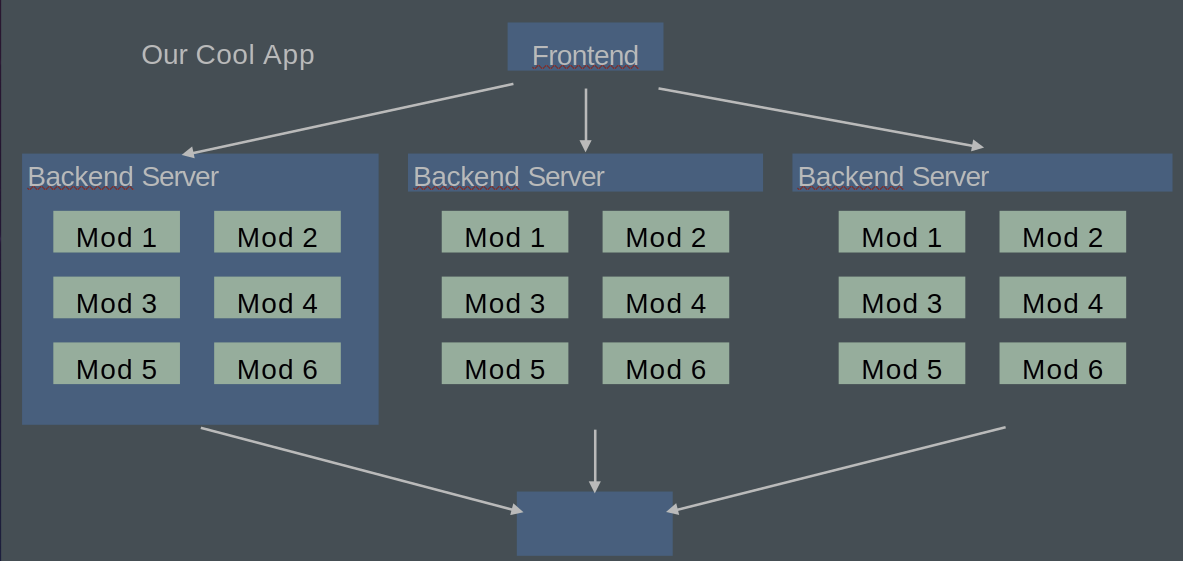
Now How Do We Scale It?
Our Cool App

Frontend → Backend Server 1 (Mod 1–6)  ↘
         → Backend Server 2 (Mod 1–6)  → Database
         → Backend Server 3 (Mod 1–6)  ↗

We run multiple copies of the backend, each with ALL modules!
What’s Wrong with This Picture?
This is called the “monolithic” app
- If we need 100 servers…
- Each server will have to run EVERY module
- What if we need more of some modules than others?
Microservices
Our Cool App

Frontend → "Dumb" Backend → Todos         (NodeJS, Firebase)
                          → Mailer        (Java, MySQL)
                          → Accounts      (Google Service)
                          → Search Engine (Java, Neo4J)
                          → Analytics     (C#, SQLServer)
                          → Facebook Crawler (Python, Firebase)
Each microservice has its own database and technology stack!
Goals of Microservices
- Add them independently
- Upgrade them independently
- Reuse them independently
- Develop them independently
➡ Have ZERO coupling between microservices, aside from their shared interface
Created : June 23, 2026